For PRO users it opens straight in the simulator. Not PRO yet? All about PRO, and meanwhile 9 scenarios are free for everyone. The PRO app interface is in Hebrew.
The mission
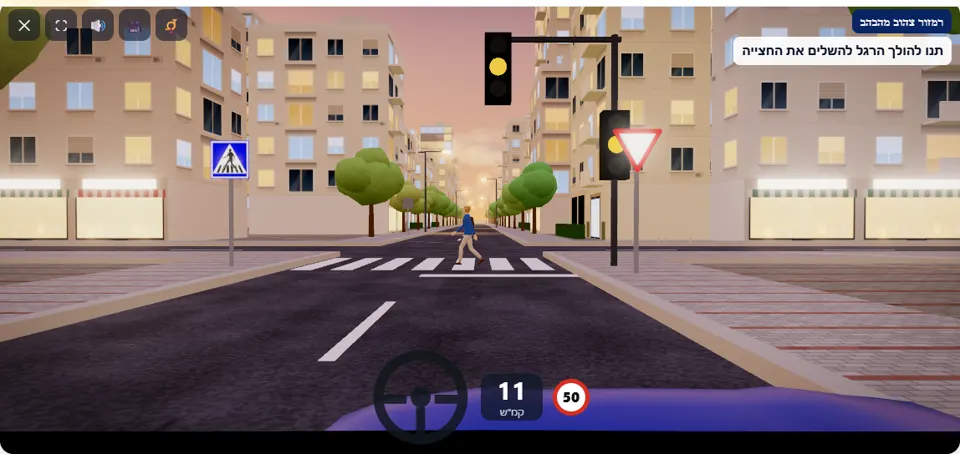
The traffic light at the intersection ahead is flashing yellow, and a “Give right of way” sign stands before it. Slow down: let the pedestrian on the pedestrian crossing finish crossing, and give right of way to the vehicle coming on the crossing road. Drive on only when the crossing is clear and there is a safe gap.
It is dusk, and the colours of the traffic light at the intersection do not change – only the yellow lamp flashes, about once a second. Before the light stands a “Give right of way” sign (301), and between the stop line and the intersection there is a pedestrian crossing. Green will not come: the light keeps flashing throughout the scenario.
When you are about 40 metres from the crossing, a pedestrian starts to cross. On the crossing road cars pass every few seconds, and two of them are specially timed: one reaches the intersection together with a driver who did not slow down, and one sets off the moment the pedestrian has finished crossing – exactly when an impatient driver wants to go on.
How to pass the scenario
- Slow down as soon as the flashing light comes into view. Above 30 km/h in the last six metres before the stop line the warning “Slow down – at a flashing yellow light you proceed carefully” appears (a game threshold).
- Stop before the crossing and let the pedestrian finish crossing to the other side.
- Once the crossing is clear – look both ways along the crossing road. The sign requires you to let the vehicles on it pass.
- Drive on only when no car is close on the crossing road, and cross the intersection carefully.
Mistakes that fail you
Each of these mistakes ends the drive at once, with the message quoted next to it:
- Entering the crossing while the pedestrian is still in the road. The simulator: “You entered the pedestrian crossing while the pedestrian was still crossing – at a flashing yellow light you let a pedestrian finish crossing.”
- Entering the intersection when a car on the crossing road is already close. The simulator: “You entered the intersection in front of a car coming on the crossing road – at a flashing yellow light the sign decides, and the “Give right of way” sign requires you to let it pass.”
- Not braking in time and hitting the pedestrian. The simulator: “You hit a pedestrian on the pedestrian crossing.”
- Colliding with a car crossing the intersection. The simulator: “You collided with another vehicle.”
The warning special to this scenario is for a fast approach to the stop line; apart from it there is only the speed warning. Whoever stands at the line for more than six seconds when everything is clear gets a tip – “In this scenario the light will keep flashing – when the road is clear, go on carefully” – and the tip does not cost a star.
The speeds, distances and seconds the simulator checks are game thresholds, not numbers from the law – unless they appear in the rule itself.
Keys and buttons in this scenario
Only accelerator and brake. The signal is not active – you go straight on through the intersection.
In all scenarios: on a computer – arrows or WASD to accelerate and steer, and Space to brake; on a phone – accelerator, brake and steering buttons on the screen. The C key or the 🎥 button switches between the driver’s seat and a view from behind the car, the B key or the 📯 button sounds the horn, and the 🔊 button mutes the sound.
The official theory questions on this situation
The scenario is built on 4 questions from the official Ministry of Transport bank. Each question has its own page, with all the answers:
- 59 Do traffic light instructions have priority over “right-of-way giving” signs?
Correct answer: Yes, traffic light instructions have priority over any type of traffic sign, except for a flashing yellow light
- 246
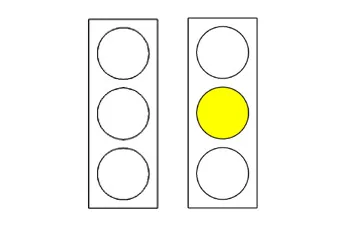 How would you conduct yourself when approaching an intersection with a yellow flashing traffic light?
Correct answer: Slow down and follow the “right-of-way” rules and the traffic signs that are placed in the intersection.
- 672
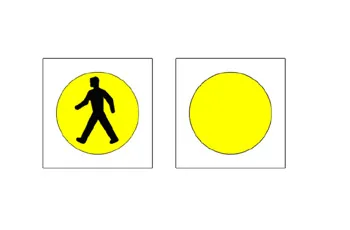 What are you required to do when the following traffic light is placed (and is flashing)?
Correct answer: Proceed carefully and allow pedestrians to cross the road safely.
- 668
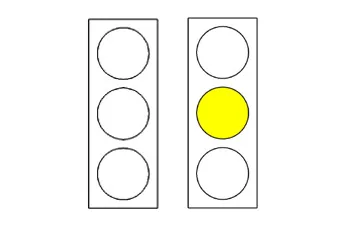 What are you required to do when a traffic light displays a flashing yellow light?
Correct answer: Proceed carefully and drive according to the traffic signs placed at the intersection.
Where to go next
- Drive the “Flashing yellow light” scenario in the simulator (opens for PRO users)
- All 32 scenarios of the driving simulator
- Test yourself: mock theory exam in English
Related scenarios
FAQ about the “Flashing yellow light” scenario
What do you do at a flashing yellow traffic light?
The traffic light or the sign – which decides?
How long should you wait for the light to change?
Sources: Traffic Regulations (Hebrew) · theory question bank on data.gov.il. The simulator is a tool for practising the rules only and does not replace driving lessons with a licensed instructor.