For PRO users it opens straight in the simulator. Not PRO yet? All about PRO, and meanwhile 9 scenarios are free for everyone. The PRO app interface is in Hebrew.
The mission
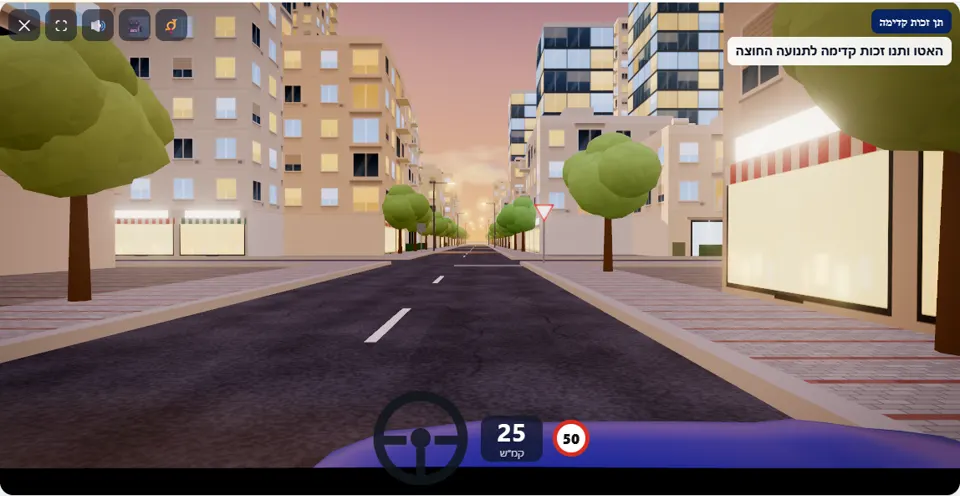
Ahead of you is an intersection with a “Give right of way” sign. Slow down, check the traffic on the crossing road, and cross only when there is a safe gap.
The intersection ahead is marked with sign 301, and on the crossing road cars pass from both directions every few seconds. Unlike a Stop sign, here you do not have to stop when the road is clear – but the traffic is dense enough that on most drives you will have to wait for a gap.
The simulator also times one car to reach the intersection together with a driver who does not slow down. A driver who approaches at 45 km/h hoping it will be clear meets it right at the entrance. A driver who slows down early gains time to look both ways and choose a gap.
How to pass the scenario
- Slow down on the approach to the intersection. Above 30 km/h in the last few metres (a game threshold) you get the warning “Slow down before the intersection – you need time to check the traffic”.
- Look right and left: cars come from both directions, not just from one.
- A car approaching? Stop before the intersection and let it pass.
- When there is a clear gap on both sides – enter and cross without lingering in the middle of the intersection.
Mistakes that fail you
Each of these mistakes ends the drive at once, with the message quoted next to it:
- Entering the intersection when a car on the crossing road is already close. The simulator: “You entered the intersection when a car on the crossing road was already close – you did not give right of way.”
- Crossing in front of a car and hitting it. The simulator: “You collided with another vehicle.”
A driver who stops completely loses no stars – stopping is not a mistake here, it is just not required. The typical warning is for entering too fast, even when by chance no car came: without slowing down there is no time to check.
The speeds, distances and seconds the simulator checks are game thresholds, not numbers from the law – unless they appear in the rule itself.
Keys and buttons in this scenario
Only accelerator and brake – there are no signals or lights in this scenario.
In all scenarios: on a computer – arrows or WASD to accelerate and steer, and Space to brake; on a phone – accelerator, brake and steering buttons on the screen. The C key or the 🎥 button switches between the driver’s seat and a view from behind the car, the B key or the 📯 button sounds the horn, and the 🔊 button mutes the sound.
The official theory questions on this situation
The scenario is built on 2 questions from the official Ministry of Transport bank. Each question has its own page, with all the answers:
- 403
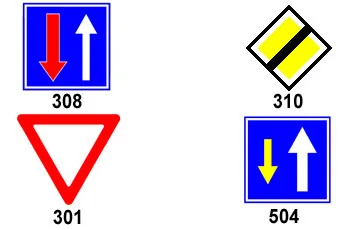 Which traffic sign that is placed before an intersection requires drivers to give right-of-way?
Correct answer:
 Sign 301
- 355
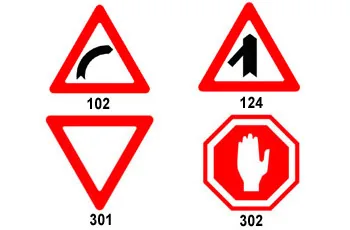 Which of the following traffic signs requires a vehicle to stop?
Correct answer:
 Sign 302
Where to go next
- Drive the “Give right of way” scenario in the simulator (opens for PRO users)
- All 32 scenarios of the driving simulator
- Test yourself: mock theory exam in English
Related scenarios
Stop sign
A full stop before the line, and only then into the intersection
To the scenario page →Intersection without signs
No sign and no traffic light – who goes in first?
To the scenario page →RoundaboutPRO
Whoever is already in the roundabout goes first – and signal as you leave
To the scenario page →FAQ about the “Give right of way” scenario
Do you have to stop at a Give right of way sign?
How big does the gap have to be?
How is it different from an intersection without signs?
Sources: Traffic Regulations (Hebrew) · theory question bank on data.gov.il. The simulator is a tool for practising the rules only and does not replace driving lessons with a licensed instructor.