Free for everyone – no sign-up and nothing to install, on a computer or a phone.
The mission
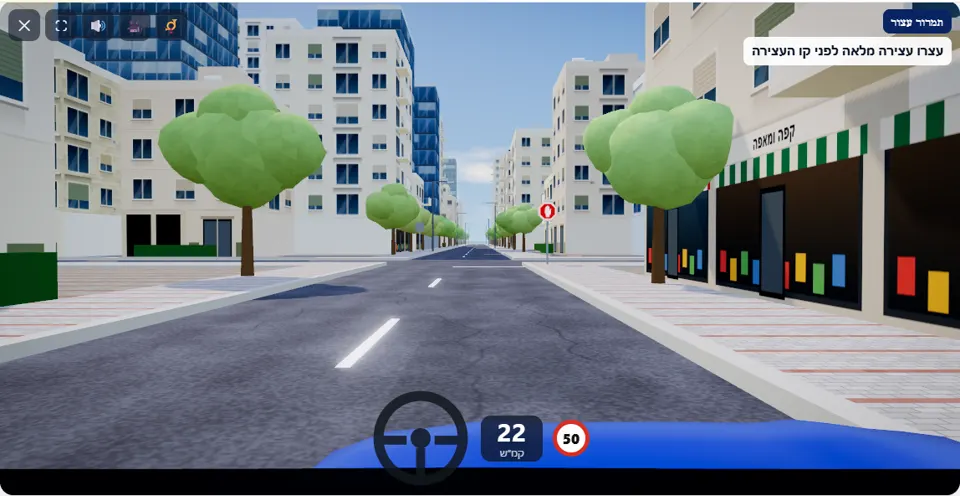
Drive to the intersection ahead. At a “Stop” sign you come to a full stop before the stop line, wait until the crossing road is clear – and only then go straight on.
This is the shortest scenario in the simulator, and also the easiest one to fail out of habit: a city street, 50 km/h, and at its end an intersection with sign 302. As you approach, the intersection looks empty – and that is exactly the trap. A driver who only slows down and “rolls” the car over the line fails, even if no car came at all.
The simulator counts a stop only when the speed drops to almost zero and the front of the car is close to the stop line. After the stop at least one car always comes along the crossing road, so that you also practise the second half of the sign: waiting until the road is really clear.
How to pass the scenario
- Slow down gradually as soon as you see the sign in the distance. Above 25 km/h close to the line (a game threshold) you get the warning “Approaching the Stop sign too fast”.
- Stop until the speedometer shows 0, with the front close to the stop line but not over it. The message “Full stop ✓ Now check that the intersection is clear” appears.
- Stopped too far back? The simulator asks you to “Move up to the stop line and stop there” – a stop far from the line does not count.
- Look both ways, let the car approaching on the crossing road pass, and go straight on only when the intersection is clear.
Mistakes that fail you
Each of these mistakes ends the drive at once, with the message quoted next to it:
- Crossing the stop line without the car coming to a complete stop. The simulator: “You did not come to a full stop before the stop line.”
- Stopping correctly, but entering the intersection in front of an approaching car. The simulator: “You entered the intersection when a car on the crossing road was already close – you did not give right of way.”
- Colliding with a car that is crossing the intersection. The simulator: “You collided with another vehicle.”
Three stars go to a drive without a single warning; one or two warnings bring it down to two, and three or more to one star. The possible warnings here are approaching the sign too fast and going over 50 km/h.
The speeds, distances and seconds the simulator checks are game thresholds, not numbers from the law – unless they appear in the rule itself.
Keys and buttons in this scenario
No special key here – the whole scenario is accelerator and brake. The road is straight, and steering is needed only to stay in your lane.
In all scenarios: on a computer – arrows or WASD to accelerate and steer, and Space to brake; on a phone – accelerator, brake and steering buttons on the screen. The C key or the 🎥 button switches between the driver’s seat and a view from behind the car, the B key or the 📯 button sounds the horn, and the 🔊 button mutes the sound.
The official theory questions on this situation
The scenario is built on 3 questions from the official Ministry of Transport bank. Each question has its own page, with all the answers:
- 355
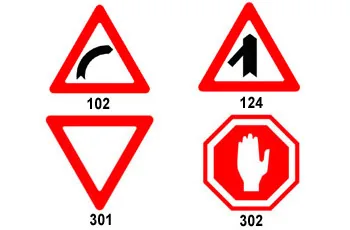 Which of the following traffic signs requires a vehicle to stop?
Correct answer:
 Sign 302
- 404
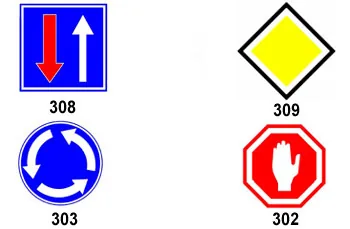 Which of the following traffic signs requires drivers to stop and give right-of-way to other approaching vehicles from either direction?
Correct answer:
Sign 302 - 462
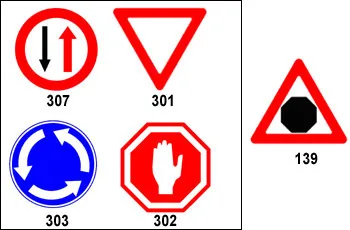 Which traffic sign should be placed at an intersection, after passing traffic sign 139 that is displayed in the following picture?
Correct answer:
Sign 302
Where to go next
Related scenarios
FAQ about the “Stop sign” scenario
How long do you have to stand at the Stop sign in the simulator?
The intersection is empty – do I still have to stop?
How is this scenario different from the “Give right of way” scenario?
Sources: Traffic Regulations (Hebrew) · theory question bank on data.gov.il. The simulator is a tool for practising the rules only and does not replace driving lessons with a licensed instructor.