Free for everyone – no sign-up and nothing to install, on a computer or a phone.
The mission
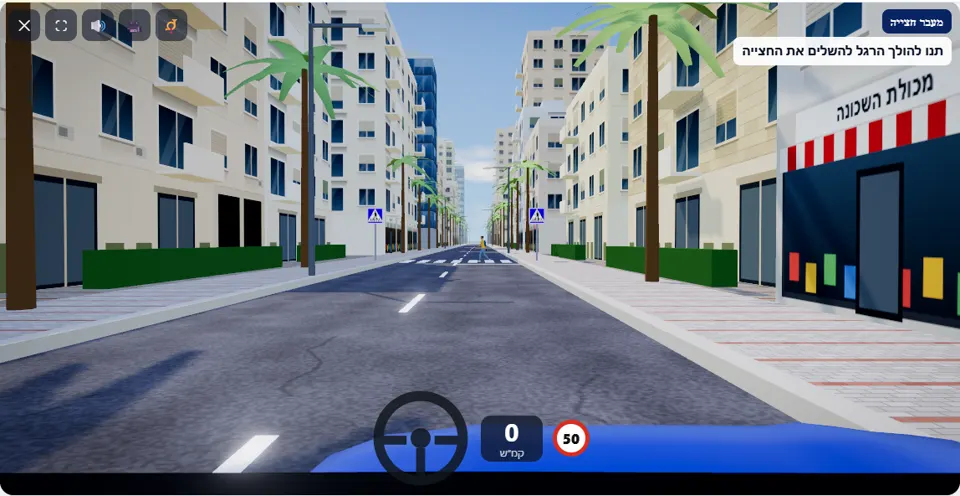
You are approaching a pedestrian crossing on an urban road. Watch out for pedestrians, and let them cross safely.
An ordinary city street, 50 km/h, and a pedestrian crossing marked with signs. While you are still a few dozen metres away, a pedestrian steps off the right-hand pavement and starts to cross, and the simulator announces “A pedestrian is stepping onto the crossing!”. From that moment the task is simple: stop before the crossing and do not move until they reach the other side.
The mistake this scenario sets out to fix is “squeezing through”: a driver who sees that the pedestrian has already passed his lane and keeps going. In the simulator that counts as a fail – as long as the pedestrian is on the road, the front of the car does not enter the crossing.
How to pass the scenario
- Take your foot off the accelerator when you see the crossing in the distance. Above 35 km/h on the stretch before the crossing (a game threshold) you get the warning “Slow down before the pedestrian crossing”.
- When the pedestrian steps into the road – brake gradually and stop before the stripes, not on them.
- Wait until they step onto the opposite pavement. The mission line reminds you: “Let the pedestrian finish crossing”.
- Only when the crossing is completely empty, drive on to the end of the street.
Mistakes that fail you
Each of these mistakes ends the drive at once, with the message quoted next to it:
- Entering the crossing while the pedestrian is still on the road, even if they are already far from you. The simulator: “You entered the pedestrian crossing while a pedestrian was still crossing.”
- Not braking in time and hitting them. The simulator: “You hit a pedestrian on the pedestrian crossing.”
The warnings here are for driving too fast on the stretch before the crossing and for going over 50 km/h, so a calm drive usually ends with three stars. Hard braking at the last moment gets no warning, but it is a sign that you noticed the pedestrian late.
The speeds, distances and seconds the simulator checks are game thresholds, not numbers from the law – unless they appear in the rule itself.
Keys and buttons in this scenario
Only brake and accelerator. It is worth keeping a finger on the Space bar (or on the brake button on a phone) from the moment the crossing comes into view.
In all scenarios: on a computer – arrows or WASD to accelerate and steer, and Space to brake; on a phone – accelerator, brake and steering buttons on the screen. The C key or the 🎥 button switches between the driver’s seat and a view from behind the car, the B key or the 📯 button sounds the horn, and the 🔊 button mutes the sound.
The official theory questions on this situation
The scenario is built on 3 questions from the official Ministry of Transport bank. Each question has its own page, with all the answers:
- 376
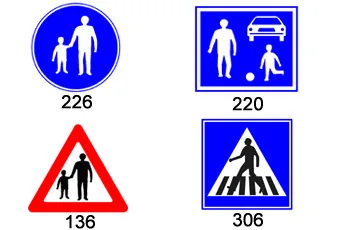 Which of the following road signs indicates a pedestrian crossing?
Correct answer:
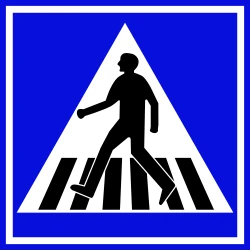 Sign 306
- 375
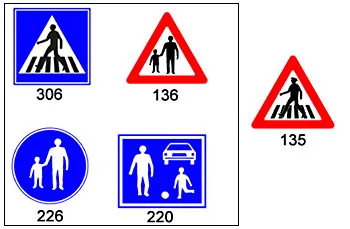 Which of the following road signs should be placed after road sign 135?
Correct answer:
Sign 306 - 1318 You are driving in the left lane of a one-way road. The driver in the right lane before you slowed down due to a pedestrian crossing the road from right to left. You are close to the pedestrian crossing, and therefore:
Correct answer: You should slow down and allow the pedestrian to finish crossing.
Where to go next
Related scenarios
Hidden pedestrianPRO
The car in the lane next to you stopped before the crossing – and you?
To the scenario page →Child runs into the road
A street with parked cars, near a school
To the scenario page →Stop sign
A full stop before the line, and only then into the intersection
To the scenario page →FAQ about the “Pedestrian crossing” scenario
When exactly may I drive on in the pedestrian crossing scenario?
Does the pedestrian cross on every drive?
How is this different from the “Hidden pedestrian” scenario?
Sources: Traffic Regulations (Hebrew) · theory question bank on data.gov.il. The simulator is a tool for practising the rules only and does not replace driving lessons with a licensed instructor.