Free for everyone – no sign-up and nothing to install, on a computer or a phone.
The mission
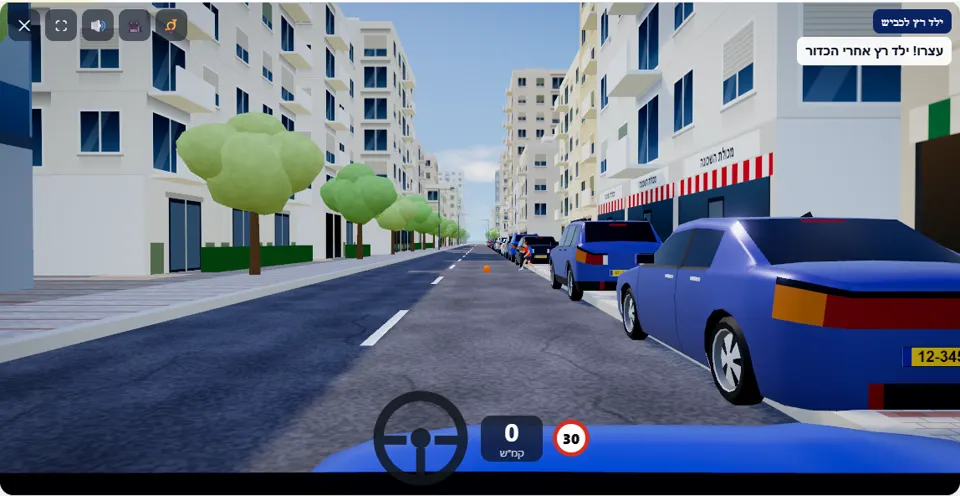
You are driving along a narrow street near a school, with cars parked at the side. The speed limit is 30 km/h. Be ready to stop at any moment.
The street here is narrow, the speed limit is 30 km/h, and along the right-hand pavement there is a row of parked cars that hides what is happening behind it. Halfway along the street the message “⚽ A ball is rolling into the road!” appears – and right after it a child runs after the ball, bends down to pick it up in the middle of your lane and carries on to the other side.
In this scenario even a driver who stayed within the speed limit can fail: a driver who carries on at 29 km/h without braking hits the child. The ball is the warning, and a driver who brakes on seeing it – before the child is even visible – stops in time.
How to pass the scenario
- Drive slowly from the start of the street and keep away from the parked cars – a driver who hugs them hits them.
- Keep your eyes on the gaps between the parked cars and on the edge of the road, not only on your lane.
- Seen a ball? Brake at once to a full stop, without waiting to see whether someone runs after it.
- Stay where you are while the child picks up the ball, and drive on only after they have stepped onto the opposite pavement.
Mistakes that fail you
Each of these mistakes ends the drive at once, with the message quoted next to it:
- Driving on while the ball rolls into the road. The simulator: “You hit the child who ran after the ball.”
- Hugging the row of parked cars. The simulator: “You hit a parked car – keep away from the roadside.”
- Driving above the speed limit for a few seconds. The simulator: “You drove above the speed limit (30 km/h).”
The only warning in this scenario is about speed: when the needle goes a few km/h past 30, “Over 30 km/h – slow down!” appears, and it costs a star. Everything else is a matter of reaction – you either stopped in time or you did not.
The speeds, distances and seconds the simulator checks are game thresholds, not numbers from the law – unless they appear in the rule itself.
Keys and buttons in this scenario
Accelerator, brake and gentle steering to keep away from the parked cars. No special key.
In all scenarios: on a computer – arrows or WASD to accelerate and steer, and Space to brake; on a phone – accelerator, brake and steering buttons on the screen. The C key or the 🎥 button switches between the driver’s seat and a view from behind the car, the B key or the 📯 button sounds the horn, and the 🔊 button mutes the sound.
The official theory questions on this situation
The scenario is built on 2 questions from the official Ministry of Transport bank. Each question has its own page, with all the answers:
- 480 How is a driver required to drive near a group of children?
Correct answer: Slow down, be prepared to stop and even stop if necessary..
- 1318 You are driving in the left lane of a one-way road. The driver in the right lane before you slowed down due to a pedestrian crossing the road from right to left. You are close to the pedestrian crossing, and therefore:
Correct answer: You should slow down and allow the pedestrian to finish crossing.
Where to go next
Related scenarios
Children’s bus stoppedPRO
A children’s bus is letting pupils off – stop or pass?
To the scenario page →Pedestrian crossing
A pedestrian steps into the road – what do you do?
To the scenario page →Hidden pedestrianPRO
The car in the lane next to you stopped before the crossing – and you?
To the scenario page →FAQ about the “Child runs into the road” scenario
What speed should I drive at in the child scenario?
Where does the child come from?
Where else do you practise children near the road?
Sources: Traffic Regulations (Hebrew) · theory question bank on data.gov.il. The simulator is a tool for practising the rules only and does not replace driving lessons with a licensed instructor.