For PRO users it opens straight in the simulator. Not PRO yet? All about PRO, and meanwhile 9 scenarios are free for everyone. The PRO app interface is in Hebrew.
The mission
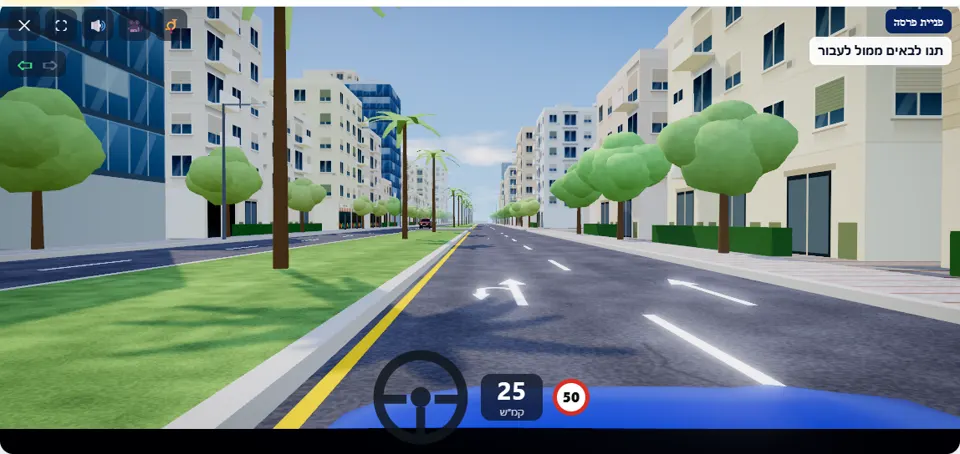
You have missed your destination and want to go back. At the intersection ahead there is no sign forbidding a U-turn. Signal left (Q key or the signal button), move into the left-hand lane and slow down – in the right-hand lane the arrow allows only driving straight on. Let every oncoming vehicle pass, and make the U-turn only when nobody will have to brake because of you. In the turn itself the steering wheel turns by itself.
The road here is divided: two lanes in each direction, and in the middle a raised central divider that opens only at the intersection. A side street joins from the right, and the intersection has neither a Stop sign nor a Give right of way sign. You start in the right-hand lane, and arrows are marked on the road: in the right-hand lane – straight on only, in the left-hand lane – straight on or a U-turn.
On the opposite carriageway the cars come in waves: a few cars close together, and then a pause. Moving into the lane, signalling and slowing down you do yourself; the turn itself is steered automatically, and what stays in your hands is the moment you start.
How to pass the scenario
- Move into the left-hand lane early. Whoever is still in the right-hand lane on the approach to the intersection gets a reminder: “For a U-turn, move into the left-hand lane – the arrow in the right-hand lane allows only straight on”.
- Press Q (or ⇦ on a phone) and signal left even before you slow down. A signal turned on only in the last few metres gets a warning.
- Slow down, and stop at the opening if cars are approaching on the opposite carriageway.
- Wait for a clear gap and start turning slowly. Above 25 km/h at the start of the turn a warning appears, and whoever starts to turn when an oncoming car is less than about 4 seconds from the meeting point fails (game thresholds).
Mistakes that fail you
Each of these mistakes ends the drive at once, with the message quoted next to it:
- Starting the U-turn from the right-hand lane. The simulator: “You made a U-turn from the right-hand lane – the arrow in this lane allows only driving straight on, so a U-turn from it is forbidden.”
- Starting to turn when an oncoming car is already close. The simulator: “You made a U-turn when a car was approaching from the opposite direction – turn only when traffic is not disturbed, and give right of way to oncoming traffic.”
- Driving onto the central divider outside the opening, before the turn or after it. The simulator: “You drove onto the central divider – turn round only at the opening in the intersection; do not cross the central divider.”
- Turning into an oncoming car. The simulator: “You collided with an oncoming car.”
The possible warnings: turning without a signal, signalling late, turning into a small gap (“The gap was small – next time wait for a bigger gap”), turning too fast, and standing at the opening for more than six seconds when the oncoming road is clear (“The oncoming road is clear – you can turn”).
The speeds, distances and seconds the simulator checks are game thresholds, not numbers from the law – unless they appear in the rule itself.
Keys and buttons in this scenario
The left arrow to move into the left-hand lane, and the Q key (or ⇦ on a phone) to signal left; the signal switches off by itself after the turn. In the turn itself steering is automatic – you control only the accelerator and the brake.
In all scenarios: on a computer – arrows or WASD to accelerate and steer, and Space to brake; on a phone – accelerator, brake and steering buttons on the screen. The C key or the 🎥 button switches between the driver’s seat and a view from behind the car, the B key or the 📯 button sounds the horn, and the 🔊 button mutes the sound.
The official theory questions on this situation
The scenario is built on 4 questions from the official Ministry of Transport bank. Each question has its own page, with all the answers:
- 117 Under which conditions is it permitted to make a U-turn?
Correct answer: When no traffic disturbance is caused and no passerby is at risk, provided that there is no road sign that prohibits making a U-turn.
- 1718 When is it permitted to make a left U-turn in an intersection without traffic lights?
Correct answer: When no obstruction to traffic is caused, field of vision is clear and there is no prohibiting road sign.
- 1336 What should a driver verify (according to the law) before making a U-turn on a straight road section?
Correct answer: That the turn is not made before a hill on the road.
- 792 Is a driver permitted to cross an unbroken separation line in order to make a U-turn?
Correct answer: No.
Where to go next
- Drive the “U-turn” scenario in the simulator (opens for PRO users)
- All 32 scenarios of the driving simulator
- Test yourself: mock theory exam in English
Related scenarios
Turning leftPRO
Signal, move towards the centre of the road and give right of way to oncoming traffic
To the scenario page →RoundaboutPRO
Whoever is already in the roundabout goes first – and signal as you leave
To the scenario page →Give right of wayPRO
Joining an intersection with busy traffic
To the scenario page →FAQ about the “U-turn” scenario
When is a U-turn allowed?
Why can’t you turn round from the right-hand lane?
Who do you give right of way to in a U-turn?
Sources: Traffic Regulations (Hebrew) · theory question bank on data.gov.il. The simulator is a tool for practising the rules only and does not replace driving lessons with a licensed instructor.