For PRO users it opens straight in the simulator. Not PRO yet? All about PRO, and meanwhile 9 scenarios are free for everyone. The PRO app interface is in Hebrew.
The mission
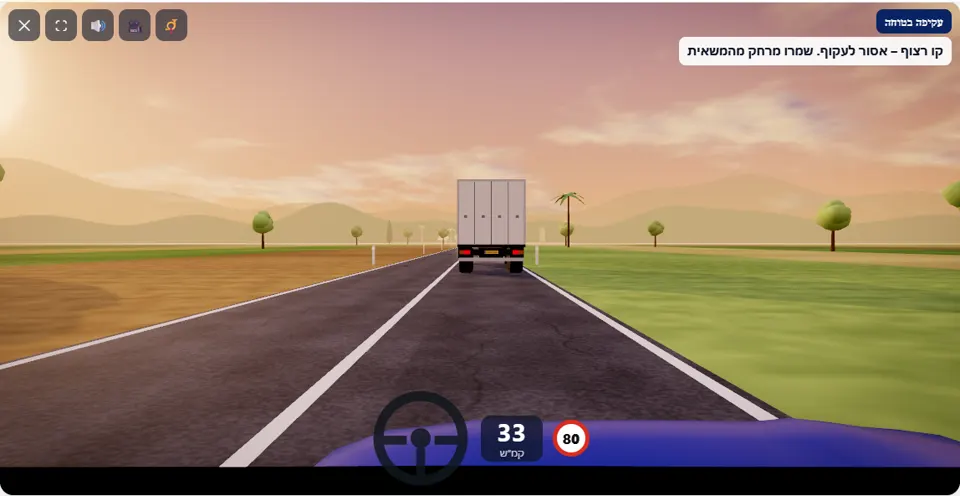
An interurban road, a slow truck ahead of you and traffic coming the other way. Overtake it – but only on a stretch with a broken separation line, when the road ahead is clear of oncoming traffic, and get back into your lane before the line turns solid again.
A two-way interurban road, 80 km/h, and a truck driving well below that. At the start the separation line is solid, then comes a long stretch of broken line, and towards the end the line turns solid again. Cars come from the opposite direction every few seconds – except for one long window, which opens shortly after the start of the broken stretch.
The scenario checks three things: that you pulled out to overtake only on the broken stretch, that the road ahead was clear of oncoming traffic, and that you got back into your lane before the line turned solid again. A driver who does not find the window can simply stay behind the truck to the end – that counts as a pass, with one star.
How to pass the scenario
- On the solid stretch, stay behind the truck, more than one second behind it.
- When the line turns broken, do not pull out at once. Wait for the last oncoming car to pass and for the road to be empty far ahead.
- Pull out to the left, accelerate without going over 80 km/h, and pass the truck.
- Return to the right only when the truck is already behind you, and before the end of the broken stretch. The message “Overtaking complete ✓” confirms it.
Mistakes that fail you
Each of these mistakes ends the drive at once, with the message quoted next to it:
- Crossing the solid line, at the start of the road or at its end. The simulator: “You crossed a solid separation line – overtaking is forbidden on this stretch.”
- Pulling out to overtake when an oncoming car is too close. The simulator: “You overtook when a car was approaching from the opposite direction – there was not enough distance to complete the overtaking safely.”
- Driving close behind the truck and not braking in time. The simulator: “You crashed into the truck in front of you.”
- Staying in the opposite lane in front of an oncoming car. The simulator: “You collided with an oncoming car.”
Three possible warnings: “Don’t drive close behind the truck – keep a gap”, “Careful – solid separation line on your left” when the wheels touch the line, and “Car approaching – get back into your lane!” when the overtaking did not fail but was borderline. A driver who stays behind the truck gets one star and an explanation that there was a safe gap.
The speeds, distances and seconds the simulator checks are game thresholds, not numbers from the law – unless they appear in the rule itself.
Keys and buttons in this scenario
Left arrow to pull out to overtake and right arrow to return. Signals are not active in this scenario.
In all scenarios: on a computer – arrows or WASD to accelerate and steer, and Space to brake; on a phone – accelerator, brake and steering buttons on the screen. The C key or the 🎥 button switches between the driver’s seat and a view from behind the car, the B key or the 📯 button sounds the horn, and the 🔊 button mutes the sound.
The official theory questions on this situation
The scenario is built on 3 questions from the official Ministry of Transport bank. Each question has its own page, with all the answers:
- 129 When is it permitted to overtake another vehicle?
Correct answer: When the road is clear and you can overtake safely without causing danger to any other road user.
- 447
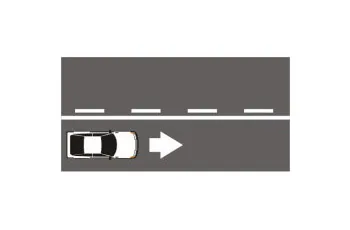 When you are driving in a roadway and there is an unbroken separation line marked to your left accompanied by a broken line to its left:
Correct answer: You are forbidden to cross the separation line.
- 123 From which side are we permitted to overtake another vehicle?
Correct answer: Only from its left side.
Where to go next
- Drive the “Safe overtaking” scenario in the simulator (opens for PRO users)
- All 32 scenarios of the driving simulator
- Test yourself: mock theory exam in English
Related scenarios
FAQ about the “Safe overtaking” scenario
Do you have to overtake to pass the scenario?
Do you need to signal in this overtaking?
How do you know the gap ahead is big enough?
Sources: Traffic Regulations (Hebrew) · theory question bank on data.gov.il. The simulator is a tool for practising the rules only and does not replace driving lessons with a licensed instructor.