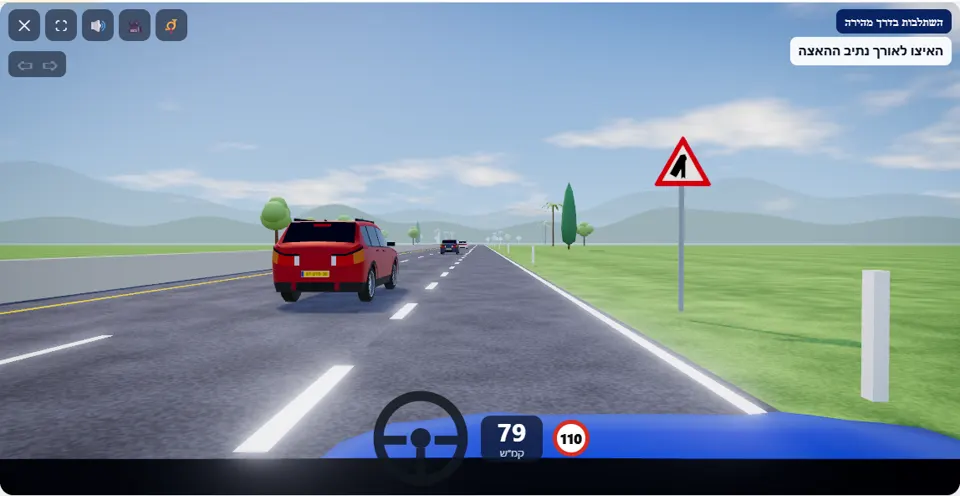
For PRO users it opens straight in the simulator. Not PRO yet? All about PRO, and meanwhile 9 scenarios are free for everyone. The PRO app interface is in Hebrew.
The mission
You are in the acceleration lane at the entrance to a freeway. Accelerate along the lane up to the speed of the traffic, signal left (Q key or the signal button), look for a safe gap in the right-hand lane and merge – without making any vehicle brake. Do not stop in the acceleration lane.
You start in the acceleration lane, to the right of a freeway with a speed limit of 110 km/h. In the right-hand lane of the freeway cars drive at about 95 km/h, at uneven intervals – some tight, some wide. The acceleration lane is long but not endless: at its end it narrows and disappears.
The simulator checks what happens to the cars behind you: if one of them has to brake or slow down noticeably because of you, while you merge or in the seconds after – you did not give right of way. Two practical conclusions follow: reach the speed of the traffic before you move over, and choose a gap with room both in front and behind.
How to pass the scenario
- Press the accelerator at once. A driver still going slowly halfway along the lane gets the reminder “Speed up to the speed of the traffic”.
- Press Q (or ⇦ on a phone) and signal left before the car starts to move over.
- Look at the lane on your left and choose a gap: a car far ahead, and a car far behind.
- Move over to the left in one movement, at a speed close to that of the traffic. The message “You have merged ✓” confirms it, and the signal switches off by itself.
- After merging, keep a gap from the car in front of you.
Mistakes that fail you
Each of these mistakes ends the drive at once, with the message quoted next to it:
- Moving into the lane slowly, or into a tight gap, so that a car behind brakes. The simulator: “A car in the lane had to brake because of you – you did not give right of way. Merge only at the speed of the traffic and at a gap that lets it carry on without slowing down.”
- Stopping in the acceleration lane to wait for a gap. The simulator: “You stopped in the acceleration lane. Stopping on a freeway is forbidden – accelerate along the lane and merge at a gap in the traffic.”
- Driving straight on until the lane ends. The simulator: “The acceleration lane ended and you did not merge into the traffic.”
- Moving over into a car driving in the lane. The simulator: “You collided with a car driving on the freeway – merge only at a safe gap.”
Two typical warnings: “Signal left before moving into the lane” for a driver who moved over without signalling, and “Keep at least one second from the car in front” for a driver who squeezed in close behind the car ahead after merging.
The speeds, distances and seconds the simulator checks are game thresholds, not numbers from the law – unless they appear in the rule itself.
Keys and buttons in this scenario
The Q key on a computer or the ⇦ button on a phone turns on the left signal. Steering left moves you from the acceleration lane into the right-hand lane of the freeway.
In all scenarios: on a computer – arrows or WASD to accelerate and steer, and Space to brake; on a phone – accelerator, brake and steering buttons on the screen. The C key or the 🎥 button switches between the driver’s seat and a view from behind the car, the B key or the 📯 button sounds the horn, and the 🔊 button mutes the sound.
The official theory questions on this situation
The scenario is built on 4 questions from the official Ministry of Transport bank. Each question has its own page, with all the answers:
- 437
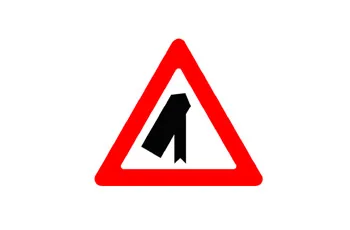 What are you required to do according to the following road sign?
Correct answer: Give right of way and carefully merge with the traffic in the road to your left.
- 27 When a driver gives “right of way”, it means that:
Correct answer: He allows other drivers to continue driving without causing them to change their speed or to stop
- 150
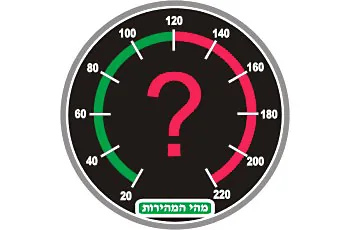 What is the maximum permitted speed for driving a private passenger vehicle on a freeway(motorway) (unless otherwise indicted)
Correct answer: 110 KPH.
- 197
 Is it permitted to stop, stand or park a vehicle on a freeway (motorway)?
Correct answer: No, unless otherwise specifically sign-posted.
Where to go next
- Drive the “Merging onto a freeway” scenario in the simulator (opens for PRO users)
- All 32 scenarios of the driving simulator
- Test yourself: mock theory exam in English
Related scenarios
FAQ about the “Merging onto a freeway” scenario
At what speed do you merge?
What do you do if there is no gap?
Do the cars on the freeway make room for me?
Sources: Traffic Regulations (Hebrew) · theory question bank on data.gov.il. The simulator is a tool for practising the rules only and does not replace driving lessons with a licensed instructor.