For PRO users it opens straight in the simulator. Not PRO yet? All about PRO, and meanwhile 9 scenarios are free for everyone. The PRO app interface is in Hebrew.
The mission
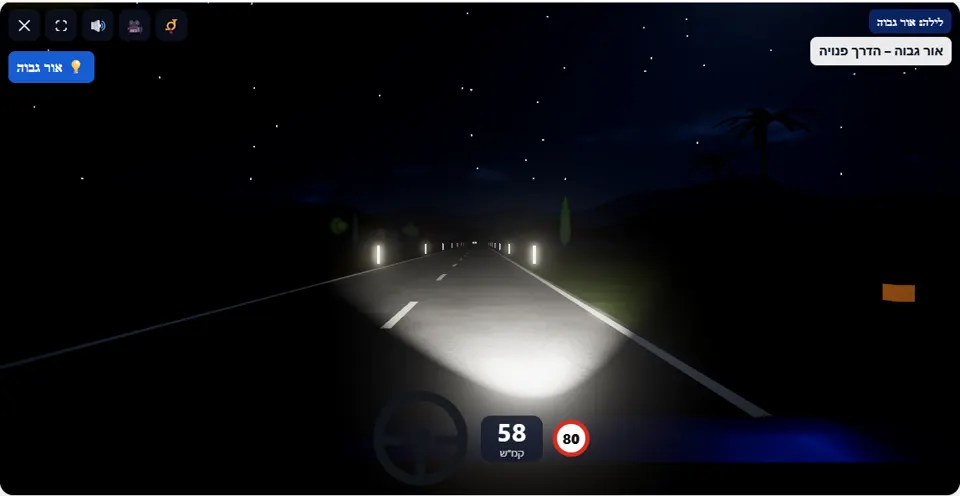
You are driving at night on an unlit interurban road, with high beam on. When a vehicle approaches from the opposite direction – switch to low beam (H key or the 💡 button), and once it has passed – go back to high beam.
An interurban road without lighting, 80 km/h, and you start with high beam on. The 💡 indicator in the corner of the screen shows which beam is on. During the drive three cars come towards you, one after another, with dark gaps between them.
Each of these cars has two moments: while it is still far away, the reminder “Car approaching – switch to low beam!” appears, and if high beam is still on when it is already close – the drive ends. Once it has passed you, the scenario expects you to go back to high beam: a driver who stays on low beam on an empty road gets a warning.
How to pass the scenario
- Drive with high beam while the road is empty, and watch for points of light appearing on the horizon.
- Seen headlights ahead? Press H (or 💡 on a phone) and switch to low beam while the car is still far away.
- Stay on low beam until it has passed you.
- Go back to high beam – and so on, three times.
- Keep to your lane: in the dark it is easy to drift onto the shoulder or into the opposite lane.
Mistakes that fail you
Each of these mistakes ends the drive at once, with the message quoted next to it:
- Leaving high beam on when the oncoming car is already close. The simulator: “You dazzled the oncoming driver – you did not switch to low beam in time.”
- Drifting off the road to the right. The simulator: “You drove onto the hard shoulder.”
- Drifting left into the lane of the oncoming car. The simulator: “You drifted into the opposite lane.”
The typical warning here is the opposite of what you might expect: “The road is clear – on a dark road it is better to go back to high beam”. It appears after a few seconds of low beam on an empty road (a game threshold), and can come back after each of the three cars.
The speeds, distances and seconds the simulator checks are game thresholds, not numbers from the law – unless they appear in the rule itself.
Keys and buttons in this scenario
The H key on a computer or the 💡 button on a phone switches between high and low beam. The indicator in the corner of the screen shows which beam is on.
In all scenarios: on a computer – arrows or WASD to accelerate and steer, and Space to brake; on a phone – accelerator, brake and steering buttons on the screen. The C key or the 🎥 button switches between the driver’s seat and a view from behind the car, the B key or the 📯 button sounds the horn, and the 🔊 button mutes the sound.
The official theory questions on this situation
The scenario is built on 3 questions from the official Ministry of Transport bank. Each question has its own page, with all the answers:
- 1542 Driving at dark with the high beam turned on might:
Correct answer: Blind (dazzle) other drivers.
- 253 Is it permitted to drive a motor vehicle on an urban road while its high-beam headlights are on?
Correct answer: No, unless the road is not properly lit and provided that other drivers are not blinded.
- 852 What would you do when driving at night and you are dazzled )blinded) by a vehicle approaching from your opposite direction?
Correct answer: Slow down, keep to the right and look at the yellow line or at the right edge of the road.
Where to go next
- Drive the “Night: high beam” scenario in the simulator (opens for PRO users)
- All 32 scenarios of the driving simulator
- Test yourself: mock theory exam in English
Related scenarios
FAQ about the “Night: high beam” scenario
At what distance should you switch to low beam?
Why do you get a warning for low beam?
How many cars come towards you?
Sources: Traffic Regulations (Hebrew) · theory question bank on data.gov.il. The simulator is a tool for practising the rules only and does not replace driving lessons with a licensed instructor.